Choose Adwisely if you want an AI-driven, hands-off approach with purpose-built Shopify integration. Best for store owners who prioritize automation and ease of setup.
Choose AdRoll if you have the time and expertise to manage campaigns manually, need more granular control, and want lower base pricing. Ideal for agencies or established e-commerce teams.
The decision between Adwisely and AdRoll ultimately depends on your store size, marketing expertise, and budget. Both platforms integrate with Shopify, but they take fundamentally different approaches to paid advertising. This 2026 comparison breaks down the key differences to help you choose the right fit.
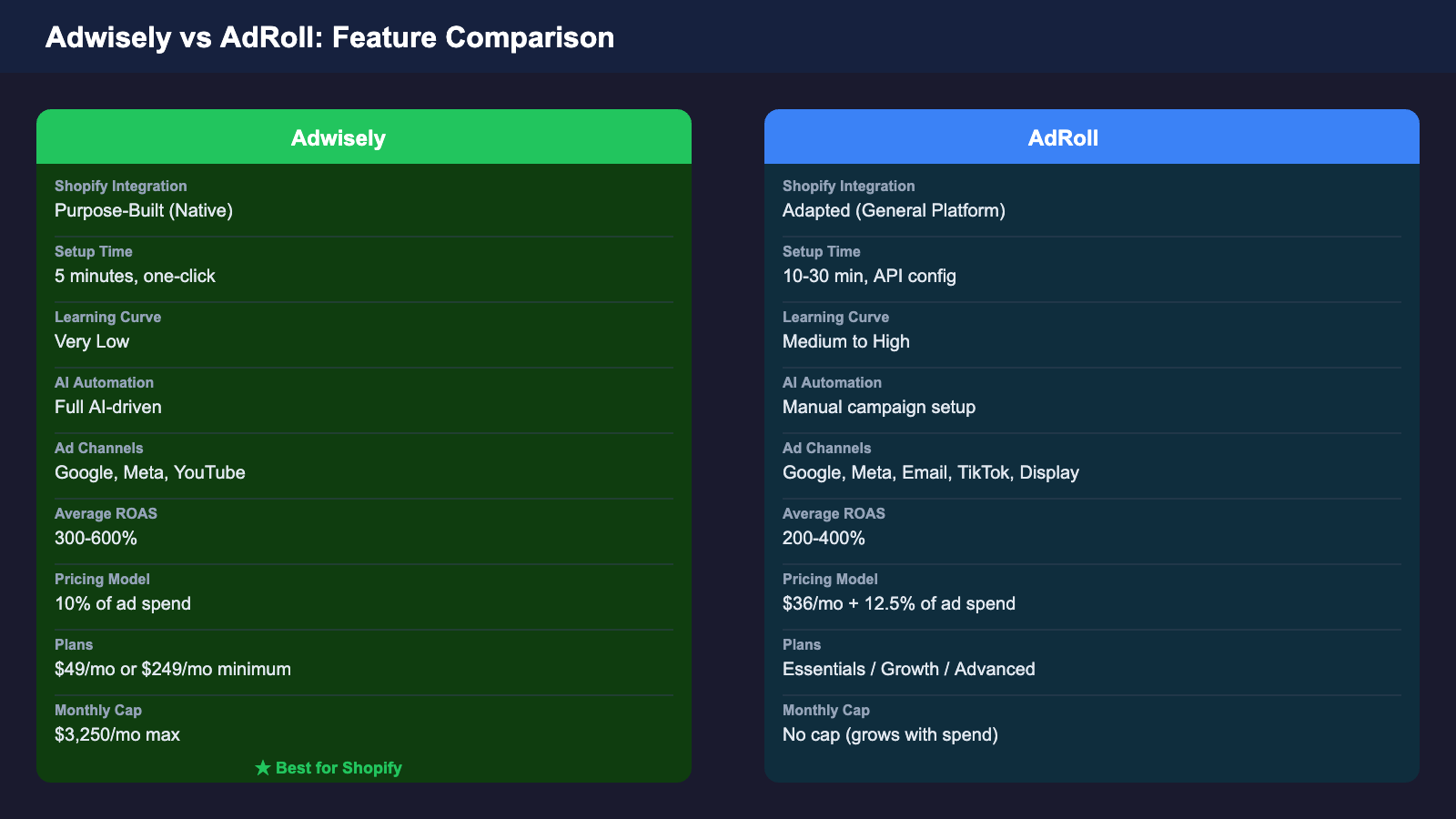
At a Glance Comparison
Feature
Adwisely
AdRoll
User Rating
4.5/5 stars
4.0/5 stars
Base Pricing
From $49/mo (10% of spend)
$36/month + 12.5% revenue share
Ad Channels
Google Shopping, Meta, Instagram, YouTube
Google, Meta, Email, Display, TikTok
Setup Model
AI-automated (hands-off)
Manual campaigns (hands-on)
Shopify Integration
Purpose-built for Shopify
Adapted from general platform
Learning Curve
Very Low
Medium to High
Average ROAS
300-600%
200-400%
Free Trial
7 days
15 days
Shopify Integration: Purpose-Built vs Adapted
Adwisely: Purpose-Built for Shopify
Adwisely was designed specifically for Shopify merchants. This purpose-built approach means:
One-click setup: Connects to your Shopify store in seconds with automatic product feed sync
Native product sync: Your entire product catalog automatically feeds into campaigns without manual mapping
Shopify metrics: Tracks data that matters—profit margin, inventory levels, customer LTV
Unified experience: Dashboard feels native to Shopify admin, not like an external tool
AdRoll: Adapted General Platform
AdRoll is a general retargeting platform that added Shopify support later. The integration is solid but comes with trade-offs:
More steps to setup: Requires API key configuration and manual feed mapping
Less Shopify-specific: Tracks general e-commerce metrics, not Shopify-specific data
External tool feel: Dashboard is platform-centric, not Shopify-native
More flexibility: Better for merchants using multiple sales channels (Amazon, eBay, etc.)
Ad Channels & Campaign Types
Adwisely Ad Channels
Adwisely focuses on the top-performing channels for Shopify product sales:
Google Shopping: Google’s primary e-commerce ad format for product promotion
Google Display: Retargeting across the Google Display Network
Meta (Facebook & Instagram): Highly visual ads optimized for product discovery
YouTube: Video ads targeting high-intent audiences
AdRoll Ad Channels
AdRoll offers a broader range of channels beyond product ads:
Google Ads: Search, Shopping, and Display networks
Meta Platforms: Facebook, Instagram, and Audience Network
With Adwisely, the platform does the heavy lifting:
Automatically creates campaigns based on your product catalog
AI continuously optimizes bids, creative, and audience targeting
Budget automatically distributes to best-performing channels
You set a monthly budget and define goals—the AI handles the rest
Ideal for: Busy store owners, beginners, those without marketing background
AdRoll: Manual Control & Customization
AdRoll requires more hands-on management but gives you more control:
Create campaigns manually with detailed audience segmentation
Write and test multiple ad creatives yourself
Manually set bids and budgets per platform
Full control over campaign timing and scheduling
Ideal for: Experienced marketers, agencies, optimization-focused teams
Pricing for Shopify Merchants
Adwisely Pricing
10% of ad spend pricing model
Simple 10% of ad spend with no hidden fees
Pricing scales transparently at 10% of your ad spend
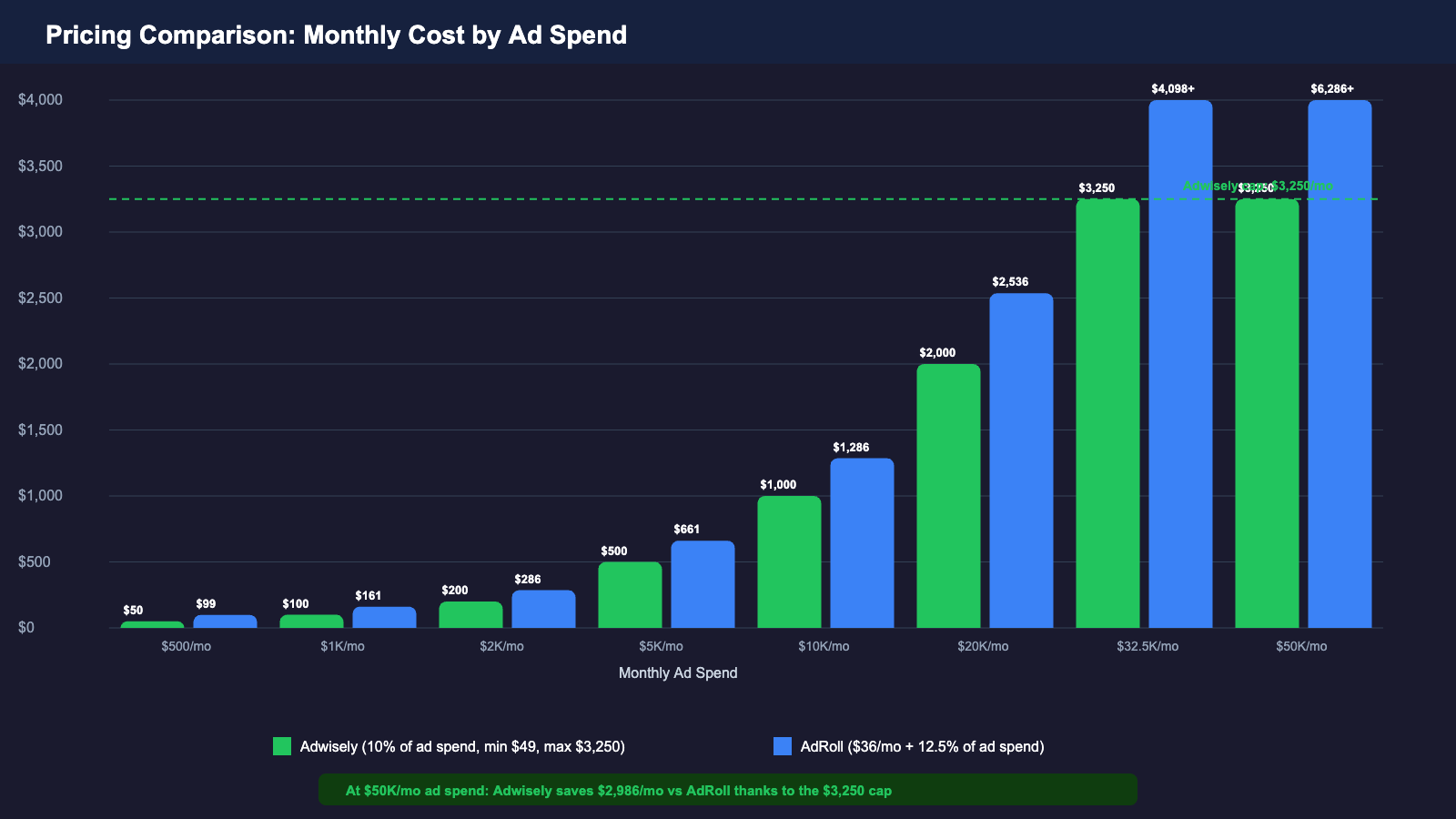
Monthly cap at $3,250 — even at $50K/mo ad spend, you never pay more
Transparent billing makes budgeting predictable
AdRoll Pricing
$36/month base + 12.5% of ad spend
Lower entry cost but scales with your advertising budget
Platform fee: $36/month minimum
Service fee: 12.5% of monthly ad spend
Better for small budgets, but costs increase as you scale
Real-World Cost Comparison
Here’s what you’ll actually pay at different monthly ad spend levels:
Monthly Ad Spend
Adwisely Cost
AdRoll Cost
You Save With
$500/mo
$50 (10% of spend)
$98.50 ($36 + $62.50)
Adwisely saves $48.50/mo
$2,000/mo
$200 (10% of spend)
$286 ($36 + $250)
Adwisely saves $86/mo
$5,000/mo
$500 (10% of spend)
$661 ($36 + $625)
Adwisely saves $161/mo
$10,000/mo
$1,000 (10% of spend)
$1,286 ($36 + $1,250)
Adwisely saves $286/mo
$50,000/mo
$3,250 (capped!)
$6,286 ($36 + $6,250)
Adwisely saves $3,036/mo
Key insight: AdRoll is cheaper for budgets under $2,000/month. Adwisely becomes more cost-effective as your ad spend grows. If you’re spending $10,000+/month on ads, Adwisely saves you 8%+ in platform fees.
Performance & ROAS
Adwisely Performance
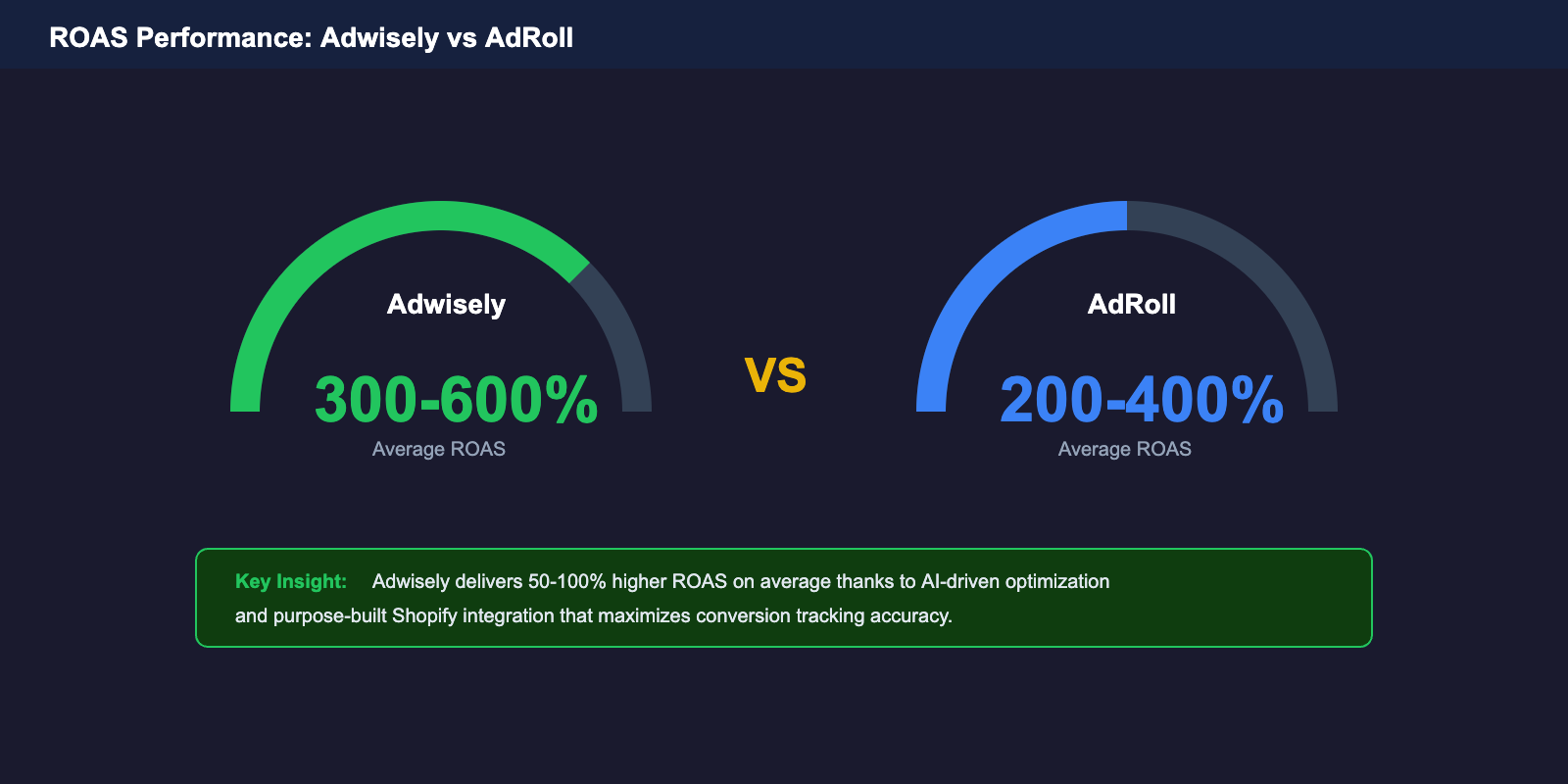
Average ROAS: 300-600% (meaning $3-6 revenue for every $1 spent)
Higher ROAS due to AI optimization focused on Shopify product sales
Especially strong performance on Google Shopping and product-focused channels
Best results for stores with rich product data (images, descriptions, reviews)
AdRoll Performance
Average ROAS: 200-400% ($2-4 revenue for every $1 spent)
More variable results depending on campaign setup quality
Stronger performance for remarketing to existing visitors
Email channel performs exceptionally well for customer retention
Performance note: Adwisely’s higher ROAS reflects its Shopify-first approach and automation. However, AdRoll’s email channel offers unique performance opportunities for customer loyalty that Adwisely lacks.
Real-World Migration: Switching from AdRoll to Adwisely
If you’re currently using AdRoll, here’s how to switch to Adwisely with minimal disruption:
Step-by-Step Migration Process
Set up Adwisely account: Sign up for Adwisely and connect your Shopify store (this takes 2-3 minutes)
Let Adwisely analyze your store: The platform takes 24-48 hours to sync your complete product catalog and historical performance data
Configure your first campaign: Define your monthly budget and business goals. Adwisely’s AI will automatically structure and optimize the campaign
Run parallel testing: For 2-4 weeks, run both AdRoll and Adwisely campaigns simultaneously. This lets you compare performance without risking your marketing momentum
Monitor ROAS and metrics: Use the same KPIs to evaluate both platforms—ROAS, cost per acquisition (CPA), and profit margin. Adwisely’s dashboard tracks Shopify-specific metrics automatically
Pause AdRoll gradually: Once Adwisely hits its stride (usually 3-4 weeks), reduce AdRoll budget and shift it to Adwisely’s top-performing channels
Archive historical data: Before completely deactivating AdRoll, download your campaign reports for historical reference
Migration tip: Many merchants find that switching to Adwisely actually increases their total ROAS because the AI optimizes across more channels than they were using on AdRoll alone.
Which Platform Should You Choose?
Choose Adwisely If:
You’re new to e-commerce advertising
You want hands-off, automated campaign management
Your ad budget will grow beyond $2,000/month
You want Shopify-specific metrics and tracking
You don’t have a dedicated marketing team
You prioritize ease of setup over manual control
You want proven Shopify integrations
Choose AdRoll If:
You have marketing expertise and want granular control
Your budget is under $2,000/month
You want to manage email campaigns alongside paid ads
You sell on multiple platforms (Amazon, eBay, etc.)
You need TikTok ad capabilities
You prefer lower base pricing and pay-as-you-grow model
You want manual bid and budget optimization
Frequently Asked Questions
Can I use both Adwisely and AdRoll at the same time?
Yes, absolutely. Many merchants run both platforms during the transition period or use them for different purposes. Adwisely handles product-focused campaigns while AdRoll manages email or TikTok. Just be mindful of audience overlap to avoid redundant ad spending. Monitor combined ROAS to ensure you’re allocating budget efficiently across both platforms.
How does product feed sync work, and can I customize it?
Both platforms automatically sync your Shopify product feeds to their ad networks. Adwisely automatically pulls all products without manual setup. AdRoll gives you more control—you can exclude products, set custom feeds per campaign, and map custom product attributes. Choose based on whether you want automation (Adwisely) or customization (AdRoll).
Which platform integrates better with Shopify?
Adwisely was built specifically for Shopify, so integration is seamless—sync happens automatically, Shopify metrics are tracked natively, and the dashboard feels like part of Shopify admin. AdRoll’s Shopify integration is robust but requires more manual configuration. If Shopify-native integration is your priority, Adwisely is the better choice.
Can I set daily or weekly budgets instead of monthly?
Both platforms support daily budget caps. Adwisely allows you to set a monthly budget, which it distributes daily. AdRoll gives you more flexibility—set daily budgets per campaign or platform. If you need granular budget control (daily adjustments, campaign-level budgets), AdRoll is more flexible.
How long does it take to see results?
Both platforms need 1-2 weeks to gather data and begin optimization. Adwisely’s AI accelerates this process (results often visible in 10-14 days), while AdRoll may take 2-4 weeks if campaigns aren’t heavily optimized. Budget size matters too—larger budgets generate data faster. Expect true ROI assessment after 4-6 weeks for either platform.
Do either platform support Google Shopping feed requirements?
Yes. Both platforms use your Shopify product data to feed Google Shopping campaigns. Adwisely handles this automatically. AdRoll requires you to verify that your product feed meets Google’s requirements. Ensure your products have clear images, descriptions, and pricing for best results on either platform.
The Bottom Line
The best advertising tool is the one you’ll actually use consistently. Both Adwisely and AdRoll integrate with Shopify, but they serve different needs. Adwisely wins for automation and Shopify-focused optimization. AdRoll wins for control and budget flexibility. Neither is universally “better”—it depends on your store size, expertise, and goals.
Start with a free trial of whichever platform appeals to your workflow. Adwisely offers 7 days free; AdRoll offers 15 days. Use the trial to:
Test the setup process and dashboard interface
See how easily your product catalog syncs
Run a small test campaign to experience the workflow
Check reporting and analytics depth
For most growing Shopify stores, Adwisely is the faster path to results because you avoid the learning curve. But if you’re already comfortable with ad management or want maximum control, AdRoll’s flexibility and lower base pricing make it worth the extra effort.
Paul M. is CEO and co-founder of Adwisely, with 10+ years of experience in advertising for Shopify businesses. His core expertise is helping e-commerce stores grow profitably through Meta Ads. Under his leadership, Adwisely has helped 10,000+ Shopify stores automate and scale their advertising campaigns.