


Adwisely vs AdRoll: Which Is Better for Shopify? (2026 Comparison)
Read More


If you’re a Shopify store owner, you’ve probably heard the hype: TikTok is where the growth is in 2026. And there’s solid data backing that up. TikTok’s shopping intent is higher than ever, their advertiser costs are still significantly lower than Meta, and brands are consistently hitting 2:1 to 4:1 ROAS on the platform.
But here’s the catch: TikTok Ads for Shopify work differently than Facebook and Instagram. The algorithm is different. The creative requirements are different. The targeting options are different. And if you copy your Meta playbook directly, you’ll burn through budget fast with disappointing results. Learning TikTok Ads for Shopify the right way from the start saves both time and money.
This guide to TikTok Ads for Shopify is built for store owners who know paid advertising, have Instagram and Facebook working, but haven’t cracked TikTok yet—or tried and failed. By the end, you’ll have a step-by-step roadmap to launch TikTok Ads for Shopify campaigns connected directly to your store, with the creative and strategy to actually get profitable sales.
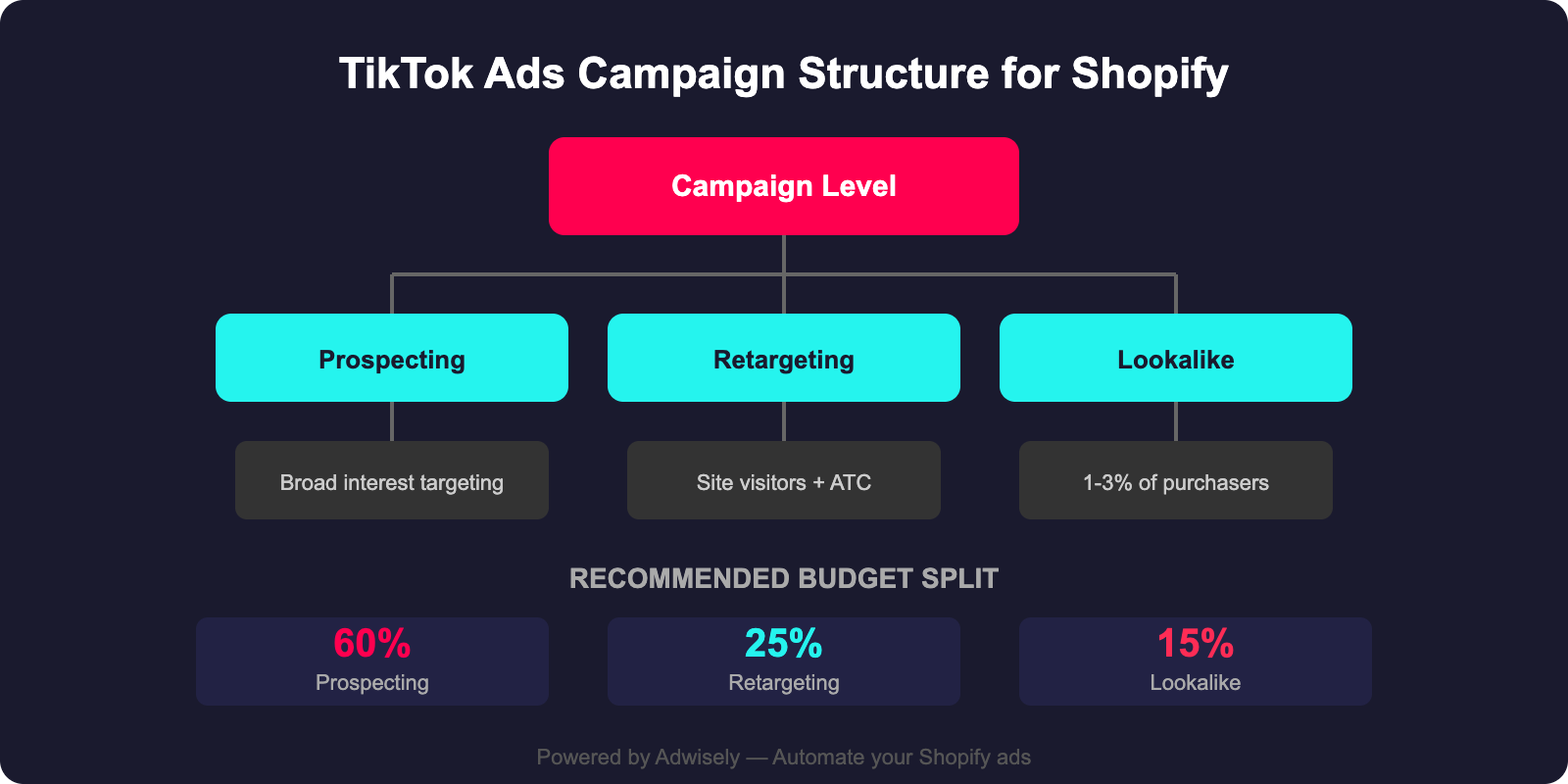
TikTok’s ad platform has matured rapidly. The TikTok for Shopify app now handles pixel tracking, product catalog sync, and retargeting directly from your store. The native integration makes TikTok Ads for Shopify easy to set up and track.
More importantly, TikTok’s audience is younger but increasingly wealthy. Gen Z and young millennials have disposable income, and they’re making purchase decisions on TikTok—not just watching dance videos. The platform has invested heavily in shoppable features, and the algorithm actively rewards brands that drive conversions.
Facebook/Instagram: Higher CPM ($10–$15+ in developed markets), but predictable scaling and lower CPC due to mature bidding systems.
TikTok: Lower CPM ($4–$8), but bid competition is rising. Early-stage campaigns can be cheaper; mature campaigns approach Meta costs. TikTok’s algorithm is more forgiving with creative changes, so you can iterate faster and find winners before costs spike.
Facebook/Instagram: Polished, aesthetically cohesive creative performs best. Lifestyle imagery, professional product photos, cinematic videos.
TikTok: Native-style, authentically created content performs best. UGC, raw unboxing videos, demo videos, behind-the-scenes footage. TikTok users are skeptical of overly produced ads. The more it looks like a regular TikTok, the higher the engagement. Vertical video (9:16) is standard.
Facebook/Instagram: Broad audience from 18–65+. Meta targeting lets you narrow by age, interests, behaviors.
TikTok: Skews younger (13–35 is the sweet spot), but increasingly 25–45. Broad targeting often outperforms narrow targeting because the algorithm decides who sees your ad based on content resonance, not demographics.
TikTok: Pixel is solid and significantly improved with the Shopify native integration. Conversion tracking relies on firing events (Add to Cart, Purchase) from your Shopify store. The Shopify app makes setup seamless.
Ads that appear in the TikTok feed, formatted like organic content. Vertical video, 9:16, 15 seconds to 3 minutes long. Your workhorse format—most of your budget goes here initially. A strong hook in the first 3 seconds is non-negotiable.
Ads that amplify existing organic TikTok posts. When organic content performs well, Spark Ads push it to a paid audience while keeping the native feel. The algorithm rewards this format highly.
Full-screen, full-height video ads that appear before the user enters the main feed. High-impact, premium cost. Best for product launches with high-converting offers and strong margins.
TikTok’s equivalent of Facebook Dynamic Ads. Pulls products from your Shopify catalog and serves them to high-intent audiences. Once you have 50+ purchase events, these can become your highest-ROAS campaigns.
Best for: Product launches, brand announcements, traffic to cold audiences. Premium cost, so you need a high-converting product or offer.
Ads that display product images from your TikTok Catalog (synced from Shopify). Similar to Facebook Dynamic Ads, but optimized for TikTok. Best for retargeting, high-intent audiences, and website visitors. Once your catalog is synced, the platform picks products based on user behavior automatically.
Recommendation: Start with In-Feed Ads for cold traffic. Add Spark Ads if you have a creator partner. Use Shopping Ads for retargeting and lookalike audiences. Save TopView for scaling proven winners.
Go to your Shopify Admin, navigate to Apps and Sales Channels, search for TikTok, and click Add app. You’ll connect your TikTok Business Account and grant permissions for Shopify to manage your pixel, catalog, and conversions.
The pixel installs automatically via the Shopify app. Verify it fires correctly using TikTok Pixel Helper (Chrome extension). Confirm that ViewContent, AddToCart, InitiateCheckout, and Purchase events all fire on the correct Shopify pages.
In the TikTok for Shopify app, go to Catalog and enable sync. This pushes your Shopify products (title, image, price, URL) to TikTok’s catalog. Initial sync takes 24–48 hours. Check TikTok Ads Manager under Assets > Catalog to confirm products appear without disapprovals.
For accurate conversion tracking post-iOS 14, enable TikTok’s Events API (server-side tracking) alongside the pixel. The Shopify app handles this automatically. Dual tracking significantly improves attribution accuracy and helps the algorithm optimize more precisely.
For Shopify stores, choose Conversions as your objective if you have at least 50 purchase events in your pixel. This tells TikTok to optimize for purchases directly. If you’re starting fresh, use Traffic for the first 2 weeks to seed your pixel with data, then switch to Conversions.
Cold traffic: Start broad. Ages 18–45, 2–3 relevant interest categories, your shipping countries. Broad targeting outperforms narrow targeting on TikTok because the algorithm finds buyers itself. Avoid stacking too many interests—it reduces the algorithm’s room to optimize.
Warm traffic / retargeting: Upload your Shopify customer list as a custom audience. Create separate ad sets for website visitors (last 30 days), add-to-cart abandoners, and past purchasers you want to re-engage. These audiences typically deliver 3–5x ROAS vs. cold traffic.
Daily budget: Start with $50–$100/day per ad set. TikTok needs 50+ conversions per week to exit the learning phase. If your budget is too low, the algorithm never optimizes fully. Scale winning ad sets by 20–30% every 3–5 days.
Placement: Use “Automatic” for new ad sets. TikTok will place your ads across TikTok Feed, Explore, etc. Later, you can test “TikTok Feed Only” if you want to narrow for higher intent.
Bid strategy:
Daily budget: Start with $15–$25/day per ad set (for Conversions objective). TikTok needs 3–7 days to learn at lower budgets. Once you hit consistent ROAS, scale 20–30% every 2–3 days.
What you set: Video creative, headline, call-to-action button, landing page.
Pro tip: Test 3–5 different creative/landing page combos in the same ad set. TikTok’s algorithm will skew impressions to the highest-performing creative, effectively A/B testing for you.
This is where TikTok differs most from Meta. Your creative needs to feel native, not like an ad. Here are the rules:
TikTok users scroll fast. If your first 3 seconds don’t grab attention, your video gets skipped. Strong hooks:
TikTok users are ad-blind to polished content. The best-performing ads look like user-generated content (UGC):
Many TikTok users watch with sound off, especially on mobile or public. Text overlays are essential:
If you use audio, make sure your creative works with it:
15–30 seconds: Optimal for conversion-focused ads. Quick hook, quick demo, quick CTA. TikTok’s algorithm rewards watch-through rate; shorter videos are easier to finish.
30–60 seconds: Good for storytelling (before/after, problem/solution, customer testimonial).
60+ seconds: Only if you have a compelling narrative. Most conversion ads underperform beyond 60 seconds.
Don’t save your CTA for the end; repeat it or make it clear throughout:
TikTok’s cost structure is favorable compared to Meta, but you need the right budget and bid strategy to succeed.
If you’re new to TikTok Ads for Shopify:
If you already have audience data: You can start with $20–$30/day and move into learning phase faster because your pixel already has historical conversion data.
Lowest Cost (Automatic):
TikTok bids whatever it thinks will get you the cheapest conversion. No caps. Best for scaling because the platform has freedom to find cheap conversions.
Cost Cap:
You set a maximum cost per conversion (e.g., “$20 per purchase”). TikTok bids to hit that target but won’t exceed it.
ROAS (Return on Ad Spend) is your gross profit divided by ad spend.
What to expect on TikTok:
Factors affecting ROAS:
Minimum viable ROAS: For steady profitability, aim for 2.5:1 ROAS on cold traffic. Below 2:1, you’re losing money or breaking even. Between 2–2.5:1, you’re profitable but with slim margins. 3:1+ is healthy scaling.
Retargeting on TikTok is where the real profit lives. People who’ve visited your site or engaged with your brand already know what you sell. Converting them is cheaper and faster.
Your TikTok pixel tracks visitors. You can build audiences from that data:
How to build these audiences: TikTok Ads Manager > Audiences > Create Audience > Website. Select your pixel and the event (View, Add to Cart, Purchase). Set the lookback window (7, 15, or 30 days).
Once your Shopify product catalog is synced to TikTok, you can run dynamic ads that show products people viewed:
Pro tip: Pair catalog retargeting with a discount code (“Use code COMEBACK for 15% off”). This pushes cart abandoners to convert.
You can upload your own customer list to TikTok for targeted retargeting:
Privacy note: TikTok hashes emails/phone numbers for matching. Your actual customer data isn’t shared with TikTok.
Build a simple retargeting funnel:
Expected performance: Retargeting campaigns typically achieve 3:1–6:1 ROAS because you’re selling to warm audiences. These are your profit drivers.
Here’s the mistake most Shopify store owners make: They start TikTok and immediately cut Meta budget to fund it. Bad move.
TikTok and Meta serve different purposes in your funnel. Meta (Facebook/Instagram) is mature, predictable, and great for retargeting. TikTok is newer, cheaper for cold traffic, and great for brand awareness. Google Ads is high-intent (people searching). You need all three.
Cold awareness: TikTok (cheaper CPM, algorithm finds your audience).
Warm retargeting: Meta (superior Advantage+ Shopping and catalog retargeting) + TikTok (catalog retargeting).
High-intent search: Google Ads (people actively searching for your product).
Budget allocation for a $2,000/month ad budget (starting):
After 3 months, adjust based on ROAS: If TikTok ROAS is 3.5:1 and Meta is 2.5:1, scale TikTok. If Google is 4:1, scale Google. Don’t cut Meta entirely; retargeting is still profitable.
One challenge: You’re now managing pixels for Meta, TikTok, and Google on one Shopify store. Make sure:
Simplify with Adwisely: If managing TikTok Ads for Shopify alongside other platforms is overwhelming, Adwisely consolidates TikTok, Meta, and Google Ads into one dashboard. You can manage budgets, review performance, and optimize all three channels from one interface—built specifically for Shopify stores.
1. Do I need to create a TikTok brand account to run ads?
No. You need a TikTok Business Account (separate from a brand account), which you set up at https://business.tiktok.com. You don’t need an organic TikTok presence to run ads. That said, having organic content (posted to your brand account) gives you content to use in Spark Ads, which often outperform in-feed ads. Not required, but helpful.
2. What’s the minimum daily budget to see results on TikTok?
$10–$15/day minimum. Below that, TikTok’s algorithm doesn’t get enough data to optimize. $20–$30/day is the sweet spot for learning phase. Once you’ve identified a winner, you can scale it. If budget is tight, focus on retargeting (lower cost) before cold traffic.
3. How do I know if my creative is good enough?
Early-stage metrics: If your ad gets 1%+ click-through rate (CTR) on TikTok, creative is engaging. If CTR is below 0.3%, re-test. For conversions: if you hit ROAS of 2:1+ in the first 5 days, scale it. If you’re hitting 1:1 or breaking even, pause and test new creative. A/B test 3–5 creative angles simultaneously.
4. Why is my ROAS lower on TikTok than on Meta?
Likely one of three reasons: (a) Your creative doesn’t match TikTok’s native style (too polished, not enough UGC). (b) You’re targeting too broadly or wrong audience. (c) Your landing page isn’t optimized for mobile (TikTok users click from phone). Test native-style creative first. If that doesn’t work, audit your landing page conversion rate separately.
5. Can I reuse Meta ad creative on TikTok?
Not directly. Facebook ad creative (often polished, horizontal, branded) underperforms on TikTok. TikTok prefers vertical, native, UGC-style video. But the *concept* or message (“30% off,” “Free shipping,” “New arrivals”) can transfer. Reformat the creative: shoot vertical, remove logos from the first frame, make it look like a regular TikTok video, not an ad. New creative takes 3–5 days to test; it’s worth it.
TikTok is no longer an experimental channel. For Shopify store owners, it’s a proven profit center. Lower CPM, higher engagement, younger audience with spending power, and the TikTok for Shopify integration makes conversion tracking seamless.
The key is to think differently about creative, respect TikTok’s algorithm (broad targeting often beats narrow), and test methodically. Start with a small budget, learn what works, then scale winners.
Your first TikTok campaign won’t be perfect. Neither was your first Meta campaign. But once you crack the formula—native creative, tight audience alignment, catalog retargeting—TikTok becomes one of your most profitable channels.
Need help managing TikTok alongside your Meta and Google campaigns? Adwisely brings all three platforms into one dashboard, so you’re not juggling three separate ad managers. Built for Shopify stores, by people who run Shopify ads. Worth a look if you’re scaling.
With the strategies outlined above, TikTok Ads for Shopify can become one of your most profitable acquisition channels in 2026.
If you found this guide helpful, check out these related resources for Shopify store owners:
Want to automate your TikTok ad campaigns? Try Adwisely free for 14 days — set up your first campaign in under 5 minutes.